
← All Business Orchestration examples

Business Orchestration · Customer and program communication

Relay

From scattered updates to communication people can act on.

Spreadsheets, forms, and contact records already contain what a team needs to communicate. Relay illustrates how DAT could use AI to help turn those outputs into personalized drafts, coordinated review, and an owned follow-up queue.

Illustrative concept

The idea at a glance

What do they already have?

Spreadsheets, submitted forms, customer or participant records, communication preferences, and text or email services.

Where does work get frustrating?

Staff repeatedly clean lists, copy details into messages, chase approvals, and lose track of who owns the next reply.

What could DAT make possible?

A connected review experience: checked source data, AI-assisted message drafts, human approval, and a shared view of follow-up.

What becomes easier?

Less manual preparation and fewer disconnected handoffs. Recipients get clearer updates, while staff can see what needs attention next.

See what those outputs could become.

The example starts with an existing spreadsheet. Reviewed messages would use the team’s existing or chosen text and email providers; customer records remain in their source systems.
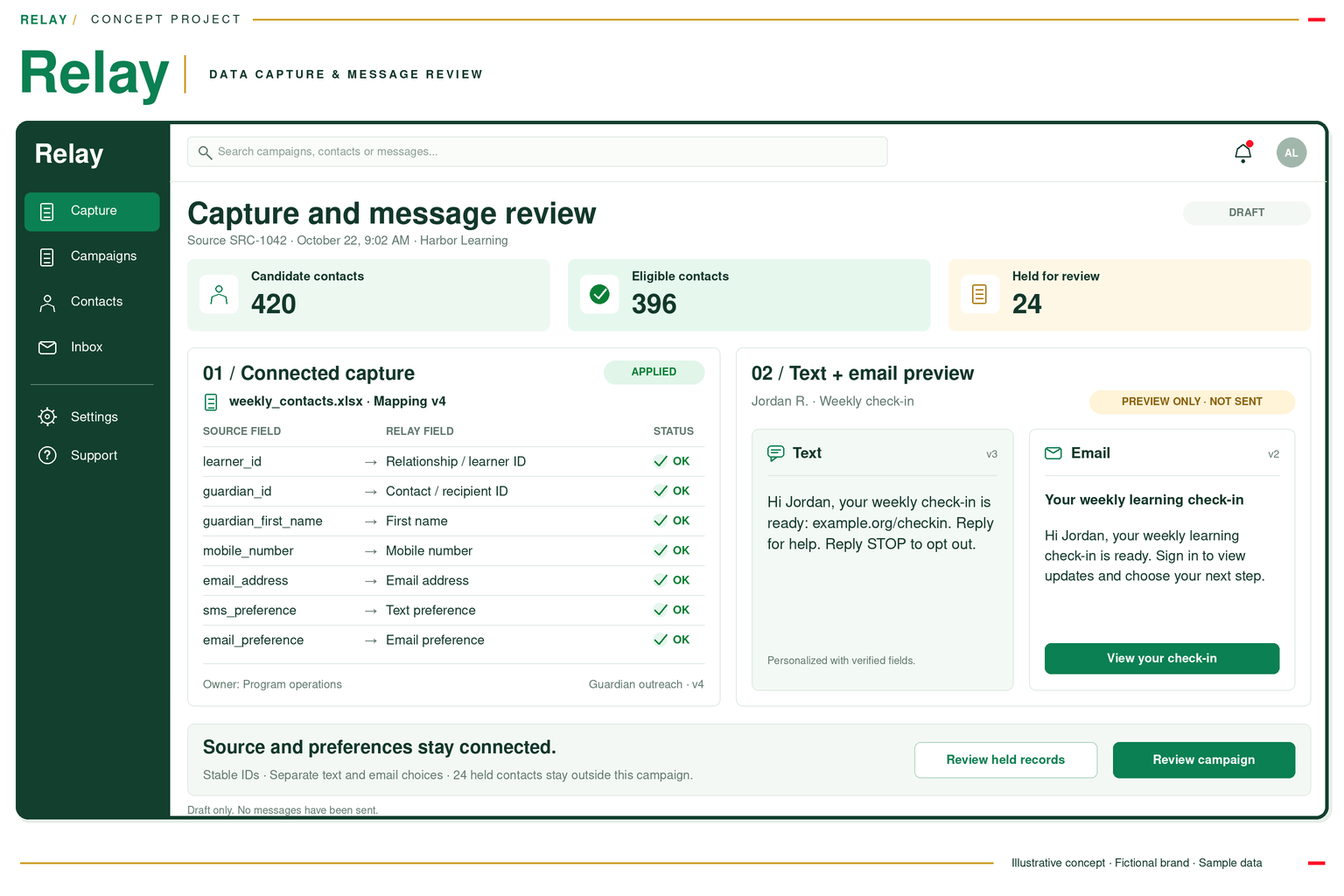
Concept screenshots with fictional data. These are visual demonstrations, not live applications.

Explore the details

Follow the proposed workflow, explore the assumptions, or see what a focused first step could involve.

How the orchestration could work
  1. 01

    Use approved outputs

    Bring existing files, form responses, or agreed record exports into saved mappings for identity and channel preferences.

    Reuse the information the team already has.

  2. 02

    Check the audience

    Apply explicit eligibility and preference rules. Hold uncertain identities or relationships for review.

    Keep unresolved records out of the send.

  3. 03

    Prepare and preview

    Use verified values and AI-assisted drafting to prepare messages. A person checks the wording and each preview against the source.

    Reduce repetitive preparation while keeping facts accountable.

  4. 04

    Approve the release

    Review the audience, message versions, and timing together. Record the approver before any release.

    Make the decision and its owner visible.

  5. 05

    Use chosen channels

    Hand approved messages to existing or chosen providers and keep each channel’s reported status separate.

    Distinguish handoff, delivery, and reading.

  6. 06

    Connect the follow-up

    Bring replies, delivery issues, and unresolved exceptions into a queue with a responsible person and next action.

    Keep the conversation connected to its context.
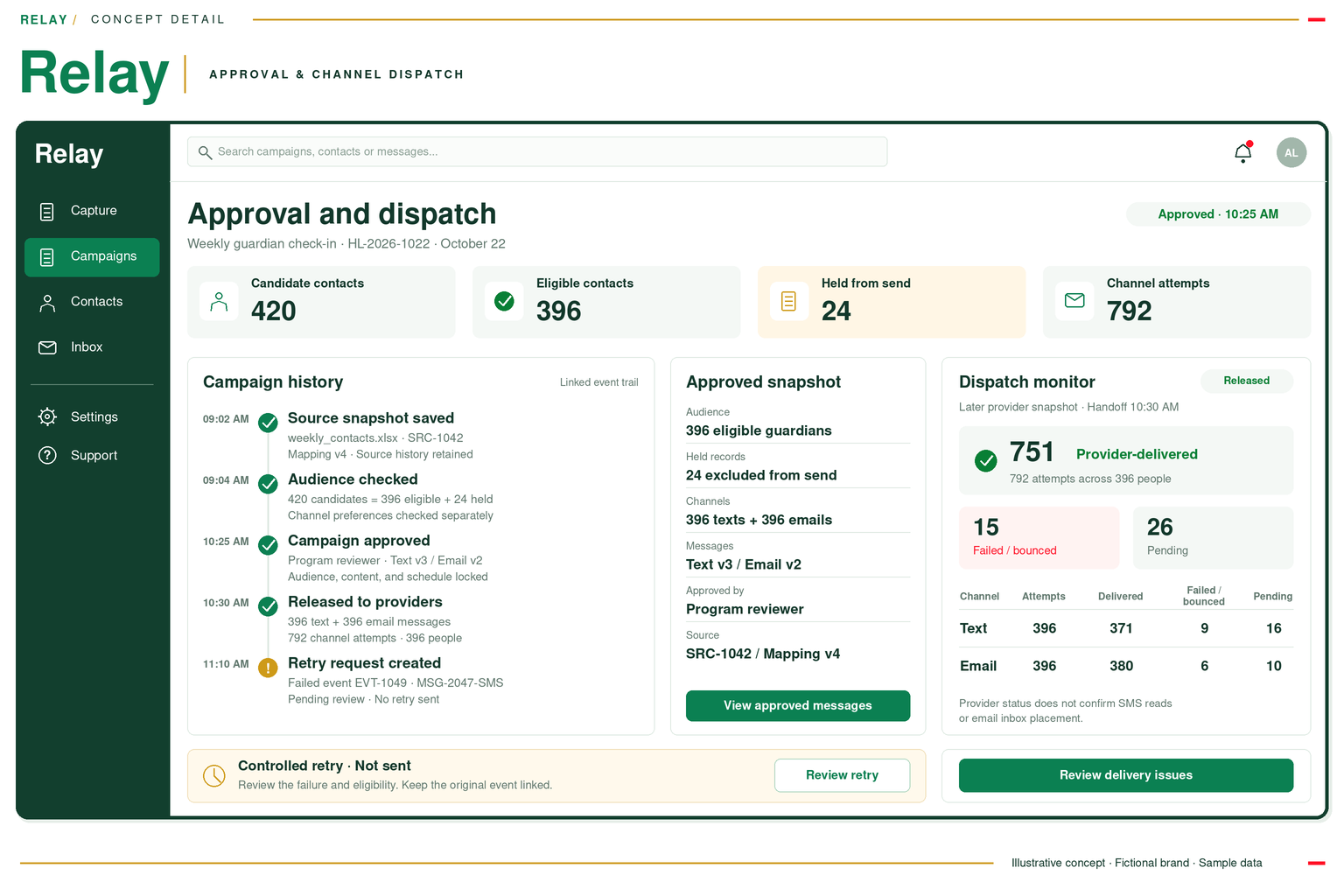
Relay concept detail showing campaign approval, audit history and separate text and email dispatch status in a single green desktop dashboard.
Campaign approval / Dispatch monitor
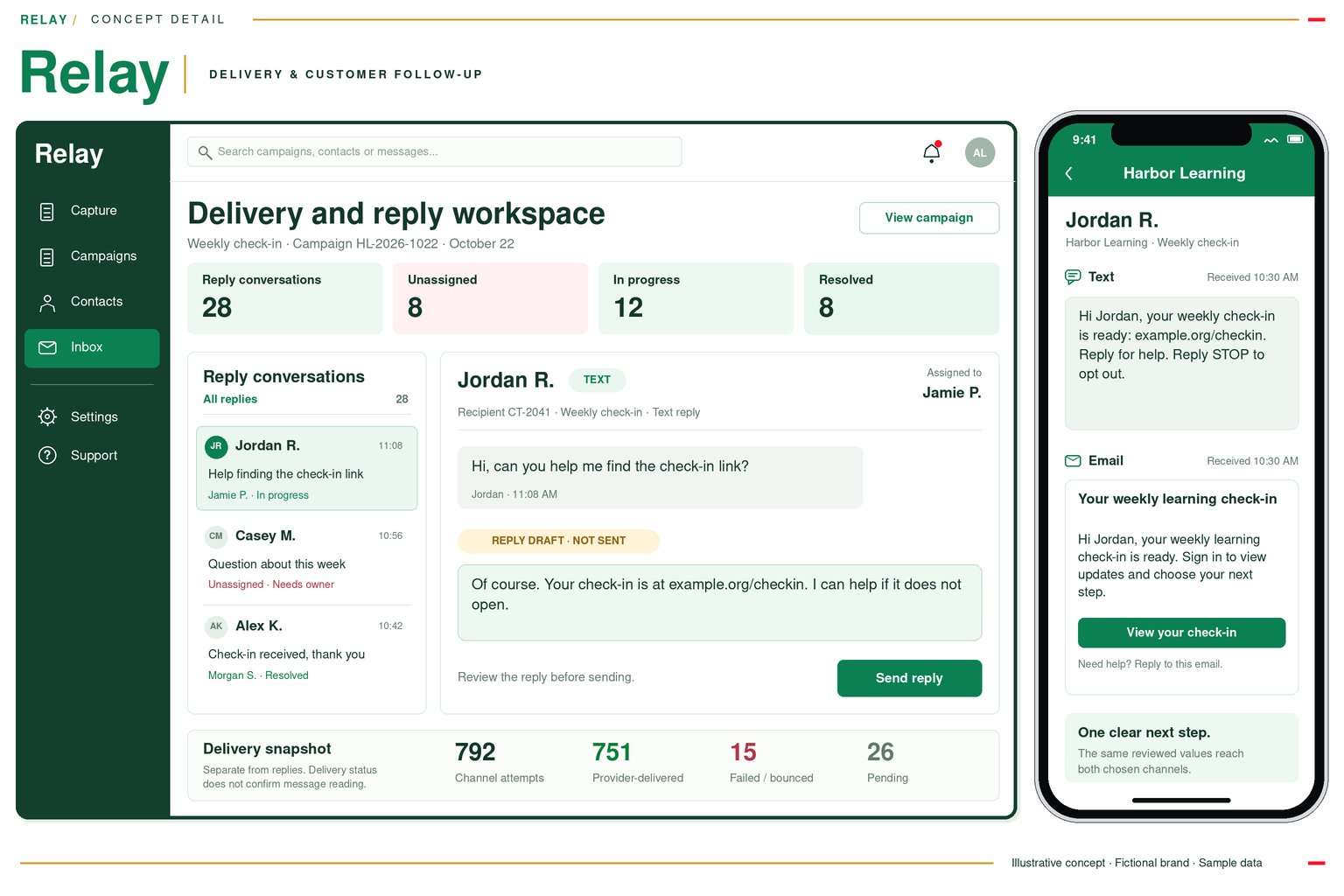
Relay concept detail: delivery and reply ownership on a desktop beside the text and email received by fictional recipient Jordan.
Delivery and reply workspace / Recipient experience

The fictional cohort contains 420 candidate contacts: 396 eligible and 24 held. Every eligible contact selected both channels, creating 396 texts and 396 emails. These 792 messages represent 396 people, not 792 recipients.
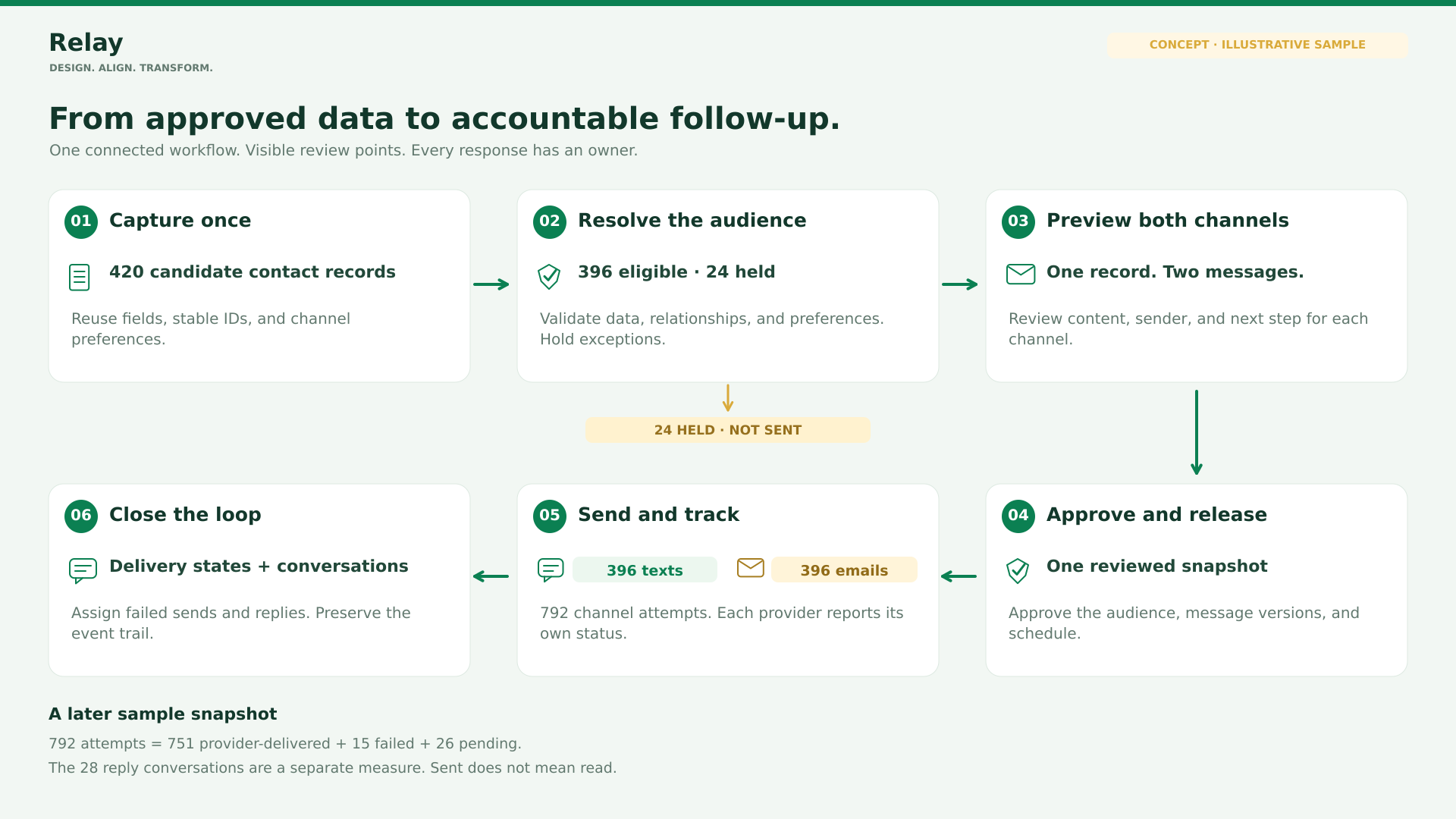
One controlled flow, from data to follow-up. Uncertain records stay on hold. Reviewed data follows two communication paths, then returns to an owned follow-up queue.
One controlled flow, from data to follow-upUncertain records stay on hold. Reviewed data follows two communication paths, then returns to an owned follow-up queue.
What DAT adds—and what stays in place

The systems you keep

Your spreadsheets, forms, CRM or program records remain the sources. Your existing or chosen text and email services deliver the messages.

The experience DAT creates

Bring source checks, message previews, approval, and follow-up together so staff can move from information to a clear next action.

Where AI helps

Draft wording from approved facts and templates, and summarize follow-up context. Deterministic checks and human review control eligibility and release.

How information moves

Start with an agreed export or form output. Use approved provider interfaces for sending and status; define permissions and ownership before adding any writeback.

AI assistance is proposed as part of these concepts. Source checks, explicit rules, and human approval remain essential before information is acted on or sent.

Explore the ROI calculator and assumptions

Explore the ROI assumptions

Adjust campaign volume, active handling time, hourly value, recognized value and costs to test the business case. The starting values are an example, not a forecast. Released capacity is shown separately from financial benefit.

Illustrative scenario. Example costs are model inputs, not DAT prices or a quote. Recognized benefit means evidenced avoided expenditure or incremental contribution after its relevant variable costs, before the project costs entered here. Useful redeployment by itself is capacity, not cash savings.
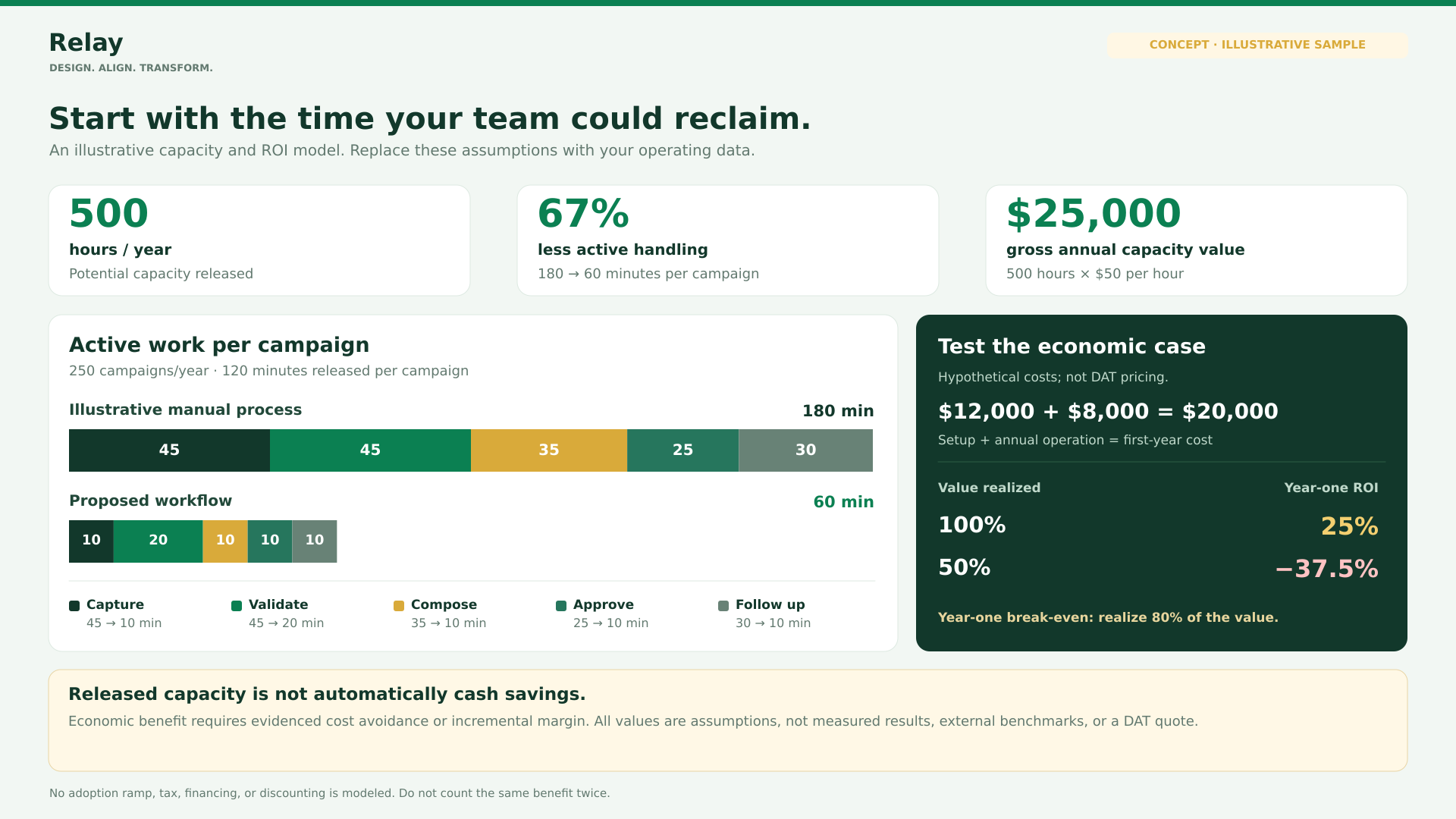
Illustrative ROI model: 180 to 60 minutes per campaign; 250 campaigns release 500 hours valued at $25,000. Hypothetical first-year cost is $20,000. Full realization gives 25% ROI; half realization gives minus 37.5%.
Potential value, with the assumptions visibleIllustrative stage-by-stage comparison: 180 minutes of manual handling versus 60 minutes in the proposed process. The difference is 120 minutes per campaign; the recording does not establish these timings. 250 campaigns × 2 hours = 500 hours of potential annual capacity. At $50 per hour, that is $25,000 of gross capacity value before costs. Recognized benefit depends on the realization input and evidence.

Your scenario inputs

100% is the starting assumption, not a measured result. Use the share supported by avoided spend or incremental contribution; use 0% if no financial benefit is evidenced.

Illustrative year-one ROI

25%

Recognized net benefit divided by total first-year cost

Annual capacity released500 hours
Gross annual capacity value$25,000
Annual recognized benefit$25,000
Year-one net benefit$5,000
Year-one cost$20,000
Simple payback8.5 months
Modeled recognized benefit and half-benefit comparison
MeasureModeled50% of modeled benefit
Annual recognized benefit$25,000$12,500
Year-one cost$20,000$20,000
Net benefit$5,000-$7,500
ROI25%-37.5%
Payback8.5 months32 months
Recognized annual benefit needed to break even in year one: $20,000.
At the modeled capacity value, the break-even realization is 80%.
USD. Assumes the modeled annual volume and recognized benefit occur within year one. Startup ramp, tax, financing, discounting and additional internal costs are not modeled. The comparison halves the currently modeled recognized benefit; costs remain the same.
Starting benefit calculation

250 campaigns × (180 − 60) minutes ÷ 60 = 500 hours/year of potential capacity.

500 hours × $50/hour = $25,000/year of gross capacity value.

Assuming 100% value realization: $25,000 × 100% = $25,000 modeled annual financial benefit.

Year-one ROI = (recognized annual benefit − initial cost − annual operating cost) ÷ (initial cost + annual operating cost).

Simple payback in months = 12 × initial cost ÷ (recognized annual benefit − annual operating cost). No payback is shown when ongoing net benefit is zero or negative.

Assumptions behind the example
  • 250 campaigns are completed each year at comparable scope, recipient complexity and communication quality. A campaign is the unit of work, not an individual message.
  • Active work falls from 180 to 60 minutes per campaign. Both figures include preparation, eligibility triage, message review, dispatch and first-pass follow-up; detailed case remediation and waiting for delivery or replies are excluded from both.
  • The $50 loaded hourly value is a customer-selected planning input. It values released capacity; it is not an external labor-rate benchmark.
  • Recognized financial value requires evidenced cost avoidance or incremental contribution after relevant costs. Redeployed hours alone do not create cash savings.
  • Do not count the same hours again as staffing savings, extra revenue, avoided rework or another benefit. Validate attribution and variable costs; do not subtract a cost twice if it is already included in the recognized benefit.
  • All inputs are illustrative assumptions, not measured results, external benchmarks, DAT prices or a quote. The source recording informs the workflow design, not these ROI timings.
  • Example first-year costs are $12,000 implementation plus $8,000 in annual operating costs. Include internal change effort, messaging charges, integration upkeep and other incremental costs in your own scenario.
  • The model assumes steady workload and value realization within year one. Ramp-up and seasonality require a separate adjustment.
  • The 50% comparison halves the modeled recognized benefit, while keeping costs unchanged. At the starting 100% realization it represents 50% realization.
  • Simple payback assumes recognized value and annual operating costs accrue evenly. It excludes financing, tax, discounting and timing effects.
First steps, measures, and dependencies

A focused first step

  • One team, one recurring communication, and an approved source output
  • Saved mappings, eligibility checks, and an owned exception queue
  • AI-assisted drafts, text/email previews, and human approval
  • Existing or chosen delivery channels, reply ownership, and baseline measurement

Possibilities to validate later

  • Additional sources, audiences, and approved templates
  • More frequent refresh through existing interfaces
  • Record writeback only with explicit scope and clear ownership
  • Follow-up summaries and recommendations subject to human review

How to measure the result

  • Active handling effort — Time the same stages across comparable campaigns; include triage and follow-up so work is not simply displaced.
  • Exception and message quality — Track held records, repeat causes, personalization corrections and audience changes before release.
  • Follow-up reliability — Measure reported delivery failures, unassigned replies and time to the first owned action; keep channel states separate.
  • Economic realization — Document actual avoided spending or incremental contribution after relevant costs, and compare it with implementation and ongoing costs.

The example releases 500 hours a year and values that capacity at $25,000 before costs. With $20,000 of hypothetical first-year costs, recognized value must reach 80% of that capacity value to break even. At 50% realization, the example produces a $7,500 first-year loss and − 37.5% ROI. Validate comparable campaign workloads, exception effort and message quality before attaching financial value to a time reduction. The proposed application does not guarantee these improvements; source quality, adoption, provider behavior and evidence of realized benefit determine the result.

What needs to be true

  • Source identities and preferences may conflict. — Assign record ownership, stable identifiers and exception rules before integration; do not merge unresolved contacts by phone alone.
  • Provider events do not prove receipt or reading. — Define provider handoff, delivery events, failure, reply and read states separately for each channel.
  • Saved time may remain paid time. — Report capacity separately and recognize financial benefit only with customer evidence.
  • Automation can move work elsewhere. — Measure review, remediation and follow-up effort alongside throughput, message quality and staff adoption.

What could your existing information make possible?

Bring us a repetitive task and the outputs your team already uses. We can explore a focused way to turn them into a more useful experience.

Tell us what gets in the way ↗